
What Is Automation? A Complete Beginner’s Guide
Imagine starting your workday and finding that several tasks are already done. Your emails are sorted, a customer has received an automatic reply, a report has been created, and your calendar has been updated—all without anyone having to handle each task manually.
Sounds convenient, right?
That’s the basic idea behind automation. You may have heard about automation in business, technology, AI, or productivity, but it isn’t just for large companies. Many people already use automation in everyday life without realizing it.
So, what is automation for beginners? Simply put, automation uses technology to complete tasks with little or no human effort. In this guide, we’ll explore how automation works, its benefits, real-world examples, and how AI is making it smarter.
What Is Automation for Beginners?
Automation is the use of technology to perform repetitive tasks automatically, rather than requiring a person to do every step manually.
Think about a washing machine.
You put your clothes inside, choose a program, and press a button. The machine fills with water, washes the clothes, rinses them, spins them, and stops when the cycle is finished.
You don’t need to stand beside it and tell it what to do every few minutes.
That’s automation.
In the digital world, the same basic principle applies. Instead of a machine washing clothes, software might move information, send emails, create reports, update databases, or notify employees.
A simple automation example
Suppose you run an online store.
Every time someone places an order, you could manually:
- Check the order.
- Send a confirmation email.
- Update the customer record.
- Notify the warehouse.
- Create an invoice.
- Send shipping information later.
That’s a lot of repetitive work.
With automation, software can handle many of these steps automatically after the customer places the order.
The human still manages the business, but technology handles the repetitive process.
How Does Automation Work?
Automation may sound complicated, but the basic process is surprisingly simple.
Most automated systems follow a pattern: Trigger → Action → Result
For example:
Trigger: A customer fills out a contact form.
Action: The system adds the customer to a database and sends a welcome email.
Result: The customer receives a response without an employee having to send it manually.
This is why understanding how automation works is easier for beginners when you think in terms of triggers and actions rather than in terms of complicated technology.
What Are the Different Types of Automation?
Automation isn’t one single technology. It appears in many forms, from simple household systems to advanced industrial machines.
Here are some common types.
1. Basic Task Automation
This is the simplest form.
A software tool performs one repetitive task automatically.
Examples include:
- Sending scheduled emails
- Creating recurring reminders
- Backing up files
- Sorting incoming messages
- Generating simple reports
These tasks are usually predictable and follow clear rules.
2. Workflow Automation
Workflow automation connects several tasks into a sequence.
For example:
A customer submits a form → their information enters a CRM → a sales representative receives a notification → the customer gets a confirmation email.
Instead of treating each task separately, automation connects the entire workflow.
This can be particularly useful when several people or applications are involved.
3. Process Automation
Process automation focuses on improving an entire business process rather than simply automating one small task.
For example, a company might automate its employee onboarding process.
When a new employee joins:
- HR enters their information.
- An account is created.
- The employee receives an email.
- Required documents are sent.
- The IT department receives a setup request.
- Training information is delivered.
One event can start a chain of connected actions.
4. Industrial Automation
Automation isn’t limited to computers.
Factories use automated machines and robotic systems to assemble products, move materials, inspect items, and perform other repetitive jobs.
These systems can work quickly and consistently, especially in environments where repetitive manual work would be difficult or dangerous.
Automation Examples You See Every Day
You don’t need to work for a technology company to experience automation.
Look around you.
1. Your smartphone
Your phone can automatically:
- Back up photos
- Update applications
- Sort notifications
- Suggest replies
- Detect spam calls
- Adjust certain settings based on your activity
2. Your email inbox
Email services can automatically identify spam, organize messages, and notify you about important emails.
3. Online shopping
After you place an order, an online store may automatically send:
- Order confirmation
- Payment confirmation
- Shipping updates
- Delivery notifications
- Review requests
No employee needs to manually send every message.
4. Smart home devices
Smart lights, thermostats, security cameras, and other connected devices can respond automatically to schedules, movement, temperature, or other conditions.
These are all examples of automation working quietly in the background.
What Are the Benefits of Automation?
So why do people and businesses invest so much time in automation?Because repetitive work can consume a surprising amount of time.
1. It saves time
The biggest advantage is simple: automation can take repetitive tasks off your plate.
If a task takes five minutes and you perform it 50 times each week, that’s more than four hours spent on one repetitive activity. Automating that task could give you those hours back.
2. It reduces repetitive work
Nobody wants to spend an entire afternoon copying information from one spreadsheet into another.
Automation can handle many repetitive activities while people focus on more meaningful work.
3. It can reduce human errors
Manual work can lead to mistakes, especially when people perform the same task hundreds of times.
A well-designed automated process can follow the same rules consistently.
However, automation isn’t perfect. A poorly designed system can repeat the wrong action just as consistently.
4. It improves productivity
When routine tasks take less time, employees can spend more energy on activities that require creativity, communication, judgment, and problem-solving.
Automation doesn’t necessarily mean replacing people. Often, it means allowing people to spend less time on boring work.
5. It can improve customer experiences
Customers don’t always want to wait several hours for simple updates.
Automated confirmations, notifications, and support messages can provide faster communication.
How Businesses Use Automation
Businesses of all sizes can use automation.
A small business owner might automate appointment reminders, invoices, email marketing, or customer follow-ups.
A larger company might automate complex processes involving multiple departments and software systems.
Here are a few common examples:
- Automatically sending appointment reminders
- Creating invoices after purchases
- Assigning customer support tickets
- Sending follow-up emails
- Updating customer records
- Generating regular reports
- Tracking inventory
- Managing employee onboarding
- Scheduling social media posts
The goal isn’t to automate everything.
The goal is to identify tasks where automation genuinely makes work easier.
What Is AI Automation?
Traditional automation usually follows predefined rules.
For example:
If a customer submits a form, send an email.
AI automation can go further.
Artificial intelligence can analyze information, recognize patterns, understand language, generate content, classify data, and make predictions.
For example, an AI-powered customer support system might read a customer’s message, understand what they are asking, classify the issue, and suggest an appropriate response.
That’s more flexible than a simple rule such as “when this form is submitted, send this email.”
AI Automation vs Traditional Automation
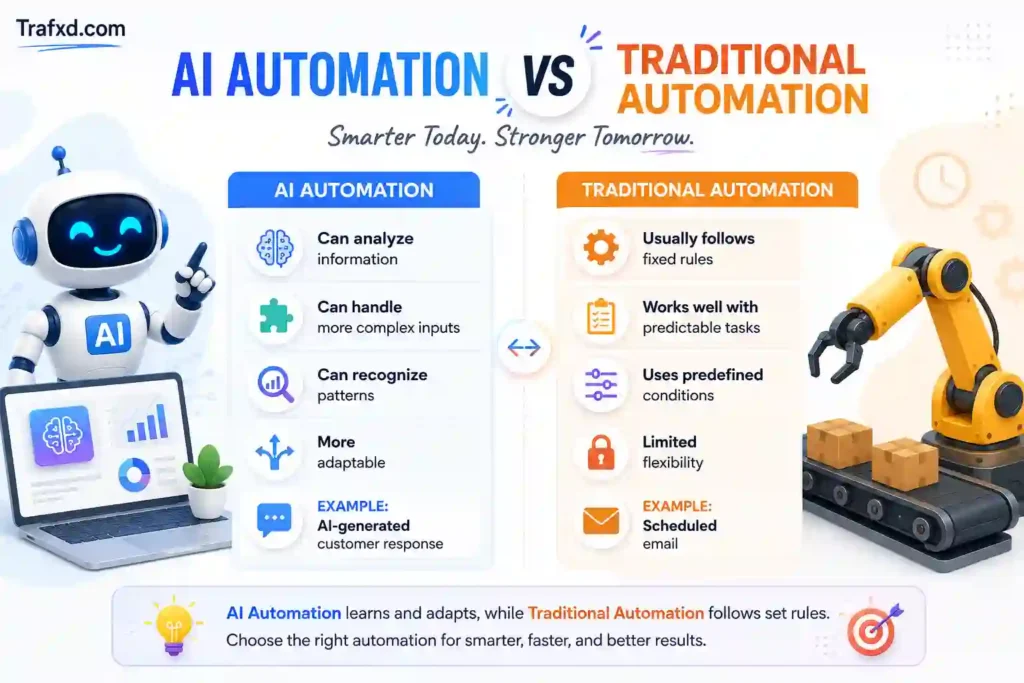
This doesn’t mean AI should replace every traditional automation system.
In many cases, the best solution is to combine both.
How AI Automation Can Help Businesses
The benefits of AI automation for businesses can be especially useful when employees deal with large amounts of information.
For example, AI can help with:
- Summarizing documents
- Classifying customer messages
- Analyzing feedback
- Generating draft content
- Extracting information from documents
- Predicting customer behavior
- Supporting customer service
- Identifying unusual patterns
Imagine receiving 500 customer reviews.
Reading every review manually could take hours.
An AI system could analyze the reviews, identify common complaints, highlight positive feedback, and summarize the main themes.
A human can then review the results and make the final decision.
That’s a much more practical approach than asking technology to make every decision independently.
What Are the Best Automation Tools for Beginners?
You don’t need to build an automation system from scratch. Many tools allow beginners to connect applications and create automated workflows.
Depending on your needs, you might use tools for:
- Email automation
- Task management
- Customer relationship management
- Marketing
- Data collection
- File management
- Scheduling
- AI-assisted workflows
The right tool depends on the problem you’re trying to solve.
Before choosing software, ask yourself: What repetitive task am I trying to eliminate?
That’s a better starting point than simply searching for the most popular automation tool.
When Should You Automate a Task?
Not every task deserves automation.
A good candidate usually has these characteristics:
- You perform it frequently.
- It follows predictable steps.
- It takes a significant amount of time.
- Mistakes are common.
- The process doesn’t require much human judgment.
For example, automatically sending an appointment reminder makes sense.
Automatically making an important business decision without human review might not.
What Are the Limitations of Automation?
Automation has plenty of advantages, but it isn’t magic.
There are situations where human involvement remains essential.
1. Automation can make mistakes
If the instructions are wrong, the system may produce the wrong result.
2. Setup takes time
Creating a reliable workflow can require planning, testing, and troubleshooting.
3. Some tasks are too unpredictable
Creative work, sensitive decisions, negotiations, and situations requiring empathy may need human involvement.
4. Automation can create security risks
Connecting multiple applications means information may move between different systems. Businesses need to think carefully about permissions, privacy, and security.
For these reasons, good automation isn’t about removing humans from every process.
It’s about creating a better partnership between people and technology.
Conclusion
So, what is automation for beginners? Simply put, it is using technology to complete repetitive tasks automatically, saving time and effort. From scheduled emails and online payments to smart home devices and AI-powered workflows, automation is already part of everyday life.
You don’t need advanced programming skills to get started. Begin by identifying one repetitive task and find a simple way to automate it. Then test the process, make improvements, and move to the next task.
As AI continues to develop, automation will become even smarter and more useful. The key is not to automate everything, but to automate what makes your work easier.
Frequently Asked Questions (FAQs)
1. Can automation save money?
Yes. Automation can reduce the time spent on repetitive tasks and help businesses use their resources more efficiently.
2. Is automation useful for freelancers?
Yes. Freelancers can automate tasks such as client reminders, invoices, emails, scheduling, and project updates.
3. Does automation require coding?
Not always. Many modern automation platforms offer no-code or low-code features, so beginners can create workflows without programming.
4. Can automation work without AI?
Yes. Traditional automation can follow fixed rules without using artificial intelligence.
5. Is automation safe to use?
It can be, but security depends on how the system is designed, what data it handles, and which permissions are given to the automation tools.
6. Can automation improve productivity?
Yes. It can handle repetitive tasks in the background, giving people more time for important and creative work.
7. What tasks should not be automated?
Tasks requiring empathy, creativity, complex judgment, or sensitive decision-making are often better handled by humans.
8. Can automation be used at home?
Yes. Smart lights, security systems, reminders, appliances, and automatic backups are common examples of home automation.