Free Ai Tools For Content Creation: A beginner’s Guide
Creating content sounds simple until you actually sit down to do it.
You need an idea, research, an outline, a headline, writing, images, social media posts, and sometimes videos. For someone working alone, this process can take hours. This is where artificial intelligence can become a useful assistant.
The top AI tools for content creation can help beginners brainstorm ideas, create outlines, improve drafts, generate visuals, write social media captions, and speed up repetitive tasks. But using AI effectively does not mean pressing a button and publishing whatever appears on the screen.
The better approach is to use AI for the parts of content creation where you need assistance while keeping your own experience, judgment, creativity, and editing involved.
This guide explains how beginners can use AI tools to build a practical content workflow, what different types of tools can do, how to choose the right one, and what mistakes to avoid.
What Are AI Tools for Content Creation?
AI content creation tools are software applications that use artificial intelligence to assist with different parts of the content production process.
Depending on the tool, you may be able to use AI to:
- Generate content ideas
- Create blog outlines
- Draft paragraphs
- Rewrite confusing sentences
- Create social media captions
- Generate images
- Create video scripts
- Develop headlines
- Summarize information
- Repurpose existing content
- Improve grammar and readability
- Brainstorm new angles for a topic
The important word here is assist.
AI can make the process faster, but it does not automatically understand your audience, personal experience, brand personality, or business goals as well as you do.
For example, imagine you want to write a blog about WordPress website speed.
Instead of asking an AI tool:
“Write a 2,000-word article about WordPress speed.”
A better approach is to give it useful context:
- Who the article is for
- What problem the reader has
- What you have personally learned
- Which points should be included
- What tone you want
- What information needs verification
The result is usually much more useful because AI has a clear job instead of being asked to replace the entire creative process.
Why Are AI Tools Becoming Popular With Content Creators?
Content creators often have more ideas than time.
A blogger may know what they want to say but struggle to organize it. A social media manager may need 20 post ideas but cannot spend the entire day brainstorming. A small business owner may need website copy, product descriptions, emails, and social posts without having a full content team.
AI can help reduce some of that workload.
1. They Help You Start Faster
One of the hardest parts of writing is starting.
You may have a topic but no clear opening. AI can help turn a rough idea into several possible directions.
2. They Help With Writer’s Block
Instead of staring at a blank document, you can ask an AI tool for:
- Five different angles
- Questions readers may ask
- Possible headlines
- An outline
- Examples
- Counterarguments
- Content ideas
This gives you material to evaluate and develop.
3. They Make Repurposing Easier
One good article can become several pieces of content.
For example:
One blog post →
- LinkedIn post
- Facebook post
- Instagram caption
- Short video script
- Email newsletter
- Pinterest description
- FAQ section
This is particularly useful for solo bloggers and small businesses.
4. They Can Reduce Repetitive Work
AI can help with tasks such as rewriting, summarizing, formatting, brainstorming, and creating first drafts.
Tools such as Canva’s Magic Write, for example, support brainstorming, outlines, captions, blog content, rewriting, and other text-generation tasks.
What Can You Create With AI?
AI is not limited to blog writing.
A modern content workflow can include several different formats.
| Content Type | How AI Can Help | Human Input Still Needed |
|---|---|---|
| Blog posts | Ideas, outlines, drafts | Research, experience, editing |
| Social posts | Captions and ideas | Brand voice and final selection |
| Images | Concepts and visual generation | Creative direction and checking |
| Videos | Scripts and ideas | Editing, visuals and presentation |
| Emails | Drafts and subject ideas | Personalization and accuracy |
| YouTube content | Topics and scripts | Personality and production |
| Product descriptions | First drafts | Product facts and differentiation |
| Newsletters | Structure and summaries | Opinion and audience knowledge |
The strongest approach is not to ask AI to create everything.
Instead, give each tool a specific job.
Top AI Tools for Content Creation
There is no single AI tool that is perfect for every creator.
A blogger may need a writing assistant. A designer may need an image generator. A video creator may need a script and editing tool. A small business owner may prefer one platform that handles several tasks.
Here are the main categories beginners should understand.
AI Writing and Brainstorming Tools
AI writing assistants can help you move from an empty page to a workable first draft.
You can use them for:
- Blog ideas
- Headlines
- Outlines
- Introductions
- Content expansion
- Rewriting
- Summaries
- Social media copy
- Email drafts
ChatGPT, for example, can be used as a brainstorming partner and writing assistant. OpenAI recommends treating its output as a draft that should be reviewed rather than as a final authority.
A Better Way to Use an AI Writing Tool
Instead of asking for an entire finished article immediately, break your work into stages.
Stage 1: Find ideas.
Stage 2: Choose one idea.
Stage 3: Build an outline.
Stage 4: Add your own information.
Stage 5: Draft individual sections.
Stage 6: Edit and fact-check.
Stage 7: Improve the final presentation.
This gives you much more control over the finished article.
AI Tools for Visual Content
A blog without useful visuals can feel difficult to read, especially when the topic is technical.
AI-assisted design tools can help creators develop:
- Blog graphics
- Social media images
- Presentation slides
- Infographics
- Thumbnails
- Promotional graphics
- Concept images
Canva combines AI-assisted writing and visual design features, making it useful for creators who want to work with both text and graphics in one environment.
Don’t Create Images Just to Fill Space
A common mistake is adding an image every few paragraphs simply because the article needs visuals.
Instead, ask:
Does this image help the reader understand something?
For example, an article explaining an AI content workflow could use a simple diagram:
Idea → Research → Outline → Draft → Edit → Fact-check → Publish
That visual provides more value than a random AI-generated picture of a robot typing on a laptop.
AI Tools for Video Content
Video creators can use AI for several parts of production.
AI can help generate:
- Video topics
- Hooks
- Scripts
- Scene ideas
- Short-form content concepts
- Captions
- Titles
- Descriptions
For example, Canva’s AI script generator can help create scripts for videos, podcasts, presentations, promotional materials, and educational content.
However, a generated script should not automatically become the final video. Add your own examples, opinions, demonstrations, or experiences.
That is what can make the content feel human rather than generic.
AI Tools for Social Media Content
Social media creators often need a constant stream of ideas. AI can help you transform one subject into multiple posts.
Suppose your original topic is:
“How to improve WordPress website speed.”
You could turn it into:
- A Facebook post with three tips
- An Instagram carousel
- A short video script
- A LinkedIn post
- A Pinterest description
- A short email
- A checklist
This approach is called content repurposing.
Instead of constantly creating something completely new, you get more value from content you have already researched and produced.
A Beginner-Friendly AI Content Workflow
One of the most useful ways to understand AI is to stop thinking about individual tools and start thinking about a workflow.
Here is a simple system beginners can follow.
Step 1: Start With the Audience
Before opening an AI tool, answer four questions:
- Who am I writing for?
- What problem do they have?
- What do they want to accomplish?
- What information would genuinely help them?
This prevents you from creating content simply because an AI tool suggested a topic.
Step 2: Choose One Specific Topic
Broad topics are difficult to make useful.
For example:
Too broad: “AI”
Better: “AI tools for content creation”
More specific: “AI tools for creating blog content for beginners”
The more clearly you define the problem, the easier it becomes to create a useful article.
Step 3: Ask AI for Angles, Not Just Answers
Instead of:
“Write my article.”
Try:
“Give me 10 practical angles for explaining AI content creation to someone who has never used an AI tool before. Avoid generic advice and focus on real beginner problems.”
Now you have ideas to evaluate.
You are using AI as a brainstorming partner instead of handing over the entire creative process.
Step 4: Build Your Own Outline
AI can suggest an outline, but you should decide what actually belongs in your article.
Remove sections that do not help your audience.
Add sections based on:
- Your experience
- Reader questions
- Examples
- Mistakes you have seen
- Your own testing
This is where your article can become different from dozens of similar pages.
Step 5: Add Real Examples
Examples make AI-related content easier to understand.
Instead of saying:
“AI can help you write better content.”
Show the reader:
Weak prompt:
Write a blog about SEO.
Better prompt:
Create five beginner-friendly blog topic ideas about SEO for small business owners. Each idea should solve a specific problem and avoid technical jargon.
The second prompt gives the AI more useful information.
Step 6: Edit the Output
Never assume that an AI-generated draft is ready for publication.
Look for:
- Repeated ideas
- Incorrect information
- Unnatural wording
- Unsupported claims
- Generic introductions
- Unnecessary paragraphs
- Fake examples
- Overuse of buzzwords
Then rewrite the content in your own voice.
Step 7: Add Something AI Cannot Know About You
This is one of the most important steps.
Suppose you are writing about building a website.
You could add:
“When I started working on my own website, I found that solving small technical issues was often more time-consuming than writing the article itself.”
That personal experience makes the content more distinctive.
AI does not know what happened during your own project unless you tell it.
How to Write Better Prompts for Content Creation
The quality of your instructions can make a major difference.
A useful prompt usually includes:
Role + Audience + Task + Context + Format + Restrictions
For example:
“Act as a beginner-friendly content strategist. Give me 10 blog ideas for people who are new to AI content creation. Focus on practical problems rather than general AI news. Provide each idea with a suggested title, target audience, and one-sentence explanation.”
This is much more useful than:
“Give me AI blog ideas.”
Prompt Formula for Beginners
You can save this simple formula:
I want + audience + task + topic + tone + format + limitations.
For example:
“I want to create a beginner-friendly blog for new content creators. Give me a simple outline explaining how AI can help with blog writing. Use short sections, practical examples, and avoid technical language.”
The “Human Layer” That Makes AI Content Better
Here is an idea many beginner creators overlook.
Think of AI-generated material as the first layer, not the finished product.
Add a second layer that belongs to you.
AI Layer
- Ideas
- First draft
- Possible headings
- Alternative headlines
- Basic explanations
Human Layer
- Your experience
- Your examples
- Your opinions
- Your screenshots
- Your testing
- Your corrections
- Your unique recommendations
- Your audience knowledge
Final Layer
- Clear editing
- Fact-checking
- Better formatting
- Useful visuals
- Internal links
- Helpful references
- Strong conclusion
This creates content that is much more useful than simply publishing raw AI output.
Google’s guidance emphasizes people-first content and asks creators to consider whether their content provides original information, analysis, substantial coverage, and a satisfying experience.
How to Compare AI Tools Before Choosing One
Don’t choose an AI tool simply because someone calls it “the best.”
Your needs are different from another creator’s needs.
Use this checklist.
| Question | Why It Matters |
|---|---|
| What does the tool actually do? | Prevents choosing a tool you don’t need |
| Is there a free plan? | Useful for beginners with limited budgets |
| Is it easy to use? | Reduces the learning curve |
| Does it support your content type? | Writing tools may not help with video |
| Can you edit the output? | Important for maintaining your own voice |
| Does it fit your workflow? | Saves time when creating regularly |
| Are there usage limits? | Prevents unexpected interruptions |
| Does it produce reliable results? | Quality matters more than speed |
The best tool is often the one you will actually use consistently.
Free AI Tools vs Paid AI Tools
Beginners often assume that a paid AI tool must automatically produce better content.
That is not always the right way to think about it.
A free tool may be enough if you only need:
- Occasional brainstorming
- Simple writing assistance
- Basic content ideas
- A few social captions
- Simple image creation
A paid plan may become useful when you need:
- Higher usage limits
- More advanced features
- Team collaboration
- Larger workloads
- Additional editing options
- More specialized workflows
For example, Canva currently provides Magic Write functionality to free users with usage limits, while paid plans provide additional usage.
Before paying, ask yourself:
“Will this feature save me enough time or improve my work enough to justify the cost?”
If the answer is no, keep using the free option.
Five Content Experiments Beginners Can Try
Instead of downloading ten AI applications at once, try five small experiments.
Experiment 1: One Topic, Five Angles
Choose one topic and ask AI to suggest five different approaches.
Pick the angle that feels most useful to your audience.
Experiment 2: Turn a Blog Into Social Posts
Take one existing article and turn it into:
- Three Facebook posts
- Three LinkedIn posts
- Five short captions
- One video script
Then edit everything to match each platform.
Experiment 3: Improve Your Existing Draft
Write a paragraph yourself.
Ask AI to identify:
- Unclear sentences
- Repeated words
- Grammar problems
- Places where an example would help
Don’t ask it to completely replace your writing.
Experiment 4: Create a Content Calendar
Give AI your topic, audience, publishing frequency, and content categories.
Ask for a monthly calendar.
Then manually select the ideas that are actually relevant.
Experiment 5: Create One Article in Multiple Formats
Take a single useful article and create:
Article → checklist → social post → short video → infographic → email
This teaches you how AI can support a complete content system rather than just writing paragraphs.
Mistakes Beginners Should Avoid
AI makes content creation easier, but it can also make bad habits easier.
Publishing the First Draft
The first AI output is rarely the best version.
Treat it as raw material.
Using the Same Prompt Every Time
If every article begins with:
“Write a 2,000-word SEO article about…”
your content can quickly become repetitive.
Change your approach.
Ask for:
- Questions
- Examples
- Contrarian viewpoints
- Case-study ideas
- Reader problems
- Practical exercises
- Comparisons
Trusting Every AI Answer
AI systems can make mistakes.
Always verify important information, particularly:
- Statistics
- Prices
- Product features
- Legal information
- Medical information
- Financial information
- Current events
Adding AI Content Without Your Own Experience
Generic AI writing often sounds polished but says very little.
Your experience can provide the missing value.
Chasing Every New AI Tool
A new AI tool appears almost every day.
You do not need all of them.
Choose a small toolkit and learn how to use it well.
A Simple AI Toolkit for a Beginner
You don’t need 20 subscriptions.
A beginner can start with a small system:
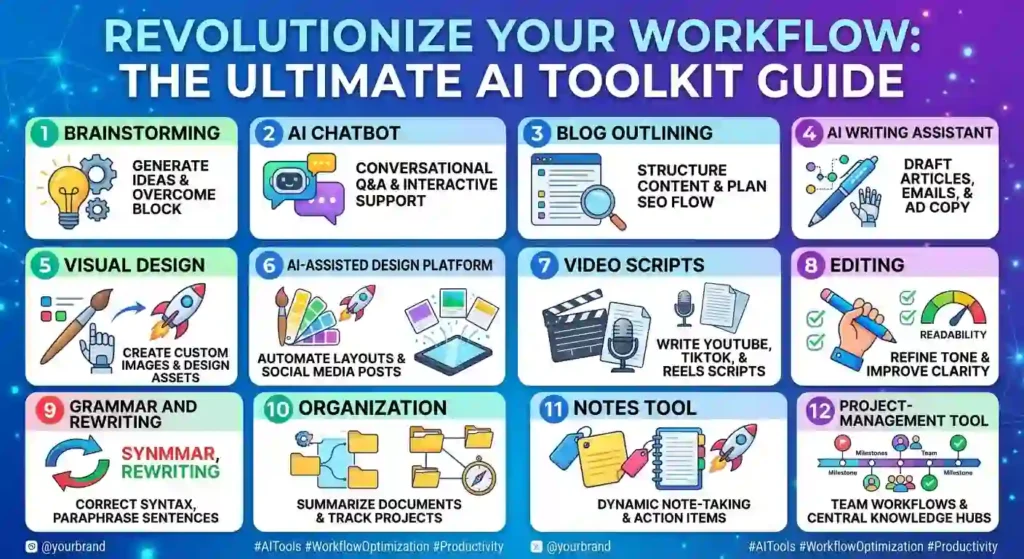
As your workload grows, you can add specialized tools. The goal is not to collect AI tools.
The goal is to create better content with less unnecessary work.
How AI Can Fit Into a Blog Publishing Workflow
If you run a blog, your workflow could look like this:
Before Writing
- Find a useful topic
- Understand the reader
- Research the subject
- Identify the main question
- Create an outline
During Writing
- Draft your ideas
- Use AI for difficult sections
- Add examples
- Add personal experience
- Create useful visuals
Before Publishing
- Check facts
- Edit the language
- Improve headings
- Remove repetition
- Check links
- Write a useful meta description
- Add relevant images
- Check mobile readability
After Publishing
- Share the article
- Turn it into social content
- Monitor performance
- Update outdated information
- Improve sections based on reader needs
This process is more sustainable than generating hundreds of articles automatically.
Can AI Replace Content Creators?
For most creators, it is better to think of AI as an assistant rather than a replacement.
AI can generate text quickly, but content creation involves much more than producing sentences.
A good creator understands:
- What the audience wants
- Which problems matter
- What information is trustworthy
- Which examples are useful
- What tone fits the brand
- What makes an article different
- What should be included and what should be removed
AI can help with the production process. The creator still provides direction.
OpenAI’s own writing guidance similarly describes AI as useful for planning, drafting, revising, and packaging while emphasizing the importance of context, constraints, and human review.
How to Make AI-Assisted Content More Original
If you want your article to stand apart from other websites, don’t just ask AI for “unique content.”
Build uniqueness into the process.
Add First-Hand Testing
If you actually tested a tool, explain:
- What you tried
- What worked
- What didn’t
- How easy it was
- What surprised you
Add Screenshots
Show readers what the tool looks like or how a feature works when appropriate.
Add Mini Case Studies
Instead of saying:
“AI saves time.”
Show a simple example:
“A 30-minute brainstorming task was reduced to a 10-minute selection and editing process.”
Add Your Own Templates
Give readers something they can immediately use.
For example:
Content idea template
- Audience:
- Problem:
- Desired result:
- Content format:
- Main question:
- Supporting points:
Add Your Own Recommendations
Don’t simply list 30 tools.
Tell readers:
“If you’re a beginner blogger, start here.”
“If you mainly create social media graphics, try this type of tool.”
“If you create videos, prioritize tools with script and editing features.”
That makes the article more useful.
A Practical 30-Minute AI Content Routine
If you are busy, you can use a short workflow.
Minutes 1–5: Choose the topic and define the reader.
Minutes 6–10: Brainstorm angles and questions.
Minutes 11–15: Build the outline.
Minutes 16–20: Draft or improve key sections.
Minutes 21–25: Add your examples and experience.
Minutes 26–30: Edit, fact-check, and identify missing information.
The exact timing will vary, but the principle is simple: Use AI to accelerate the process, not to remove the thinking.
A Beginner’s Checklist Before Publishing AI-Assisted Content
Before pressing the publish button, ask:
- Does this article solve a real problem?
- Is the information accurate?
- Did I add anything original?
- Did I explain the topic clearly?
- Did I remove unnecessary repetition?
- Does the introduction make sense?
- Are the headings easy to scan?
- Are the examples realistic?
- Did I check important claims?
- Did I add useful visuals where necessary?
- Does the article sound like my website?
- Would I personally recommend this article to someone?
If several answers are “no,” the article probably needs more work.
Conclusion
AI has changed the way people approach content creation, but the biggest opportunity is not simply generating more words.
It is creating a better workflow.
The top AI tools for content creation can help you move from an idea to an outline, from an outline to a draft, and from one piece of content to several useful formats. They can reduce repetitive work and help beginners overcome the blank-page problem.
But AI should not become a shortcut for avoiding research, creativity, editing, or responsibility.
Start small. Choose one or two tools. Learn what they do well. Give them clear instructions. Review their output. Add your own experience. Check important information. Then turn the result into something genuinely useful for your readers.
The strongest content strategy is not AI instead of people. It is AI helping people create better work.
Frequently Asked Questions
Can I create a complete blog post with AI?
Yes, AI can help you create a complete first draft, but you should review and improve it before publishing. Add your own information, examples, experience, and fact-checking instead of treating the generated draft as the finished article.
Are AI content creation tools free?
Some AI tools offer free versions or limited free usage, while others require subscriptions for advanced features or higher limits. Always check the current pricing and free-plan restrictions before choosing a tool.
Is AI-generated content good for SEO?
AI-generated content is not automatically good or bad for SEO. The important question is whether the final content is useful, reliable, original enough to provide value, and created for people rather than primarily to manipulate search rankings. Google’s guidance emphasizes people-first content rather than search-engine-first content.
Should I tell readers that I used AI?
It depends on the situation and your site’s editorial approach. Google notes that disclosure can be useful when readers might reasonably wonder how content was created.
Can AI write in my personal style?
AI can imitate a style when you provide examples and clear instructions, but you should still review the result. Your real experiences, opinions, and communication style are what make your content genuinely yours.
What is the easiest AI content task for a beginner?
Brainstorming is one of the easiest places to start. You can ask an AI tool for topic ideas, questions, headlines, or outlines without giving it complete control over your final content.
How many AI tools does a content creator actually need?
Most beginners don’t need many. Start with one general AI assistant and one tool for the type of content you create most often. Add specialized tools only when they solve a real problem.
Can AI create images for my blog?
Yes. Many modern AI-powered platforms can assist with visual creation. However, you should choose images that genuinely support the article rather than adding visuals simply to make the page longer.
How can I stop AI writing from sounding robotic?
Give the AI clear context, use shorter and more natural sentences, remove generic phrases, and most importantly, edit the content yourself. Adding personal examples and real experiences can make a major difference.
What should I do if an AI tool gives me incorrect information?
Don’t publish the claim immediately. Verify it using reliable sources, especially when the information involves statistics, current events, prices, health, finance, law, or other high-stakes subjects.
Is it better to use one AI tool or several?
For beginners, one or two tools are usually easier to manage. Learn your main tool well before adding more. A large collection of tools does not automatically produce better content.
Can AI help me turn one blog post into social media content?
Yes. This is one of the most practical uses of AI. You can turn a long article into shorter posts, captions, video scripts, email content, or other formats. However, each version should be adapted to its platform instead of copied word-for-word.
What makes AI-assisted content different from low-quality AI content?
The difference is usually the human contribution. Useful AI-assisted content includes research, editing, original examples, first-hand experience, accurate information, and a clear purpose. Low-quality content often consists of generic paragraphs produced mainly to create search traffic.