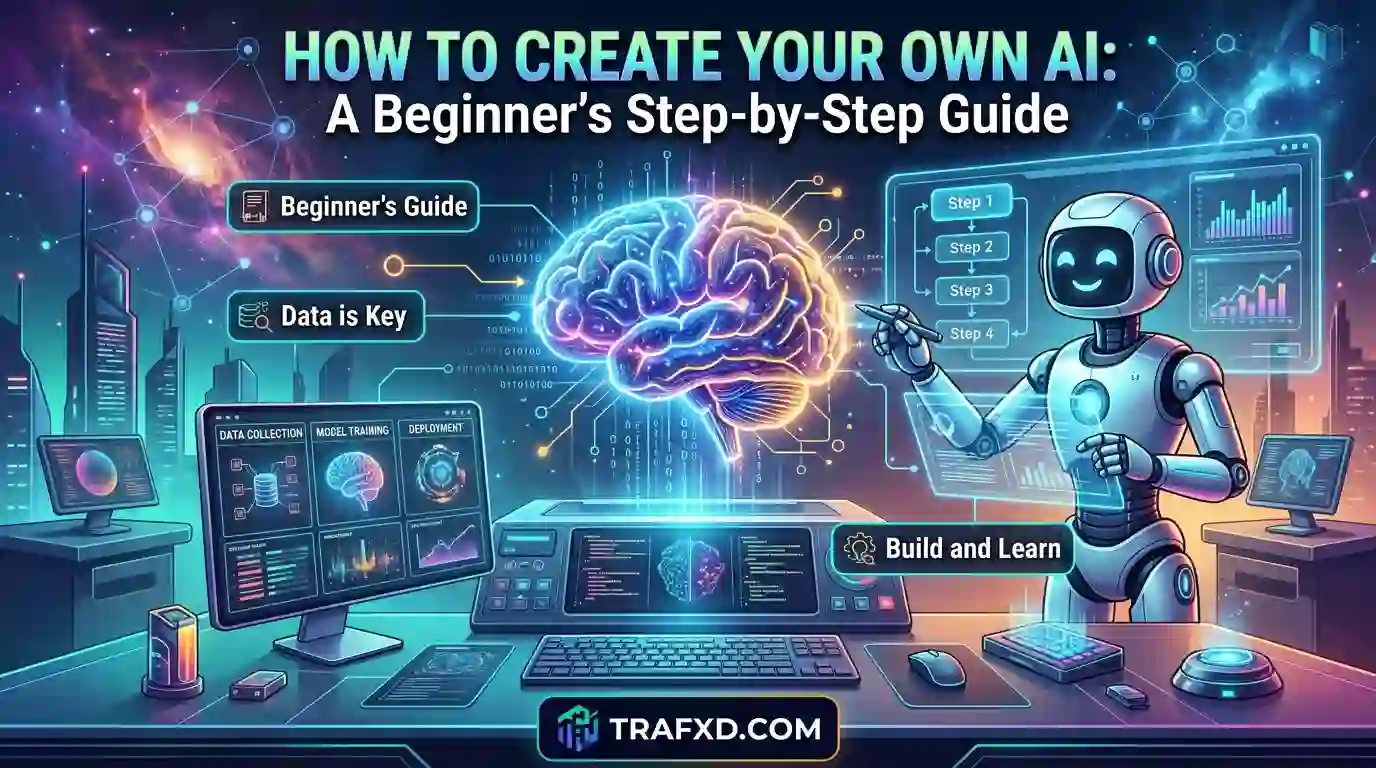
How to Create Your Own AI: A Beginner’s Step-by-Step Guide
Artificial intelligence is no longer limited to large technology companies or experienced programmers. Today, beginners can build useful AI applications with existing models, no-code platforms, and simple development tools. You could create a personal AI assistant, a chatbot for your website, or a tool that helps automate repetitive tasks.
The challenge is knowing where to start, which tools to choose, and how to turn an idea into something people can actually use. In this guide, you’ll learn how to create your own artificial intelligence, explore different development approaches, understand the costs, and follow practical steps to build your first AI application.
What Does It Mean to Create Your Own AI?
When people hear the phrase “create your own AI,” they often imagine building a powerful system like ChatGPT from the ground up. However, developing artificial intelligence can mean several different things, and you don’t necessarily need to train a massive model to create something useful.
At its simplest, building your own AI means developing an application that uses artificial intelligence to perform a specific task. That task might involve answering questions, summarizing documents, organizing information, generating ideas, or helping customers find information on a website.
For example, imagine you run a small online business. Customers frequently ask about your services, prices, and delivery options. Instead of answering every question manually, you could build an AI assistant that responds using your business information.
Similarly, a blogger could develop an AI research assistant that organizes notes, identifies related topics, and helps plan articles. A student could create a study assistant that explains difficult concepts in simpler language.
These applications can use existing AI models rather than requiring you to build an entirely new model.
There are three common approaches to consider:
- Building an AI-powered application: Connect an existing AI model to an application that solves a specific problem.
- Customizing an existing model: Adapt an existing model to a particular task through configuration, additional information, or fine-tuning when appropriate.
- Training a model from scratch: Develop and train a machine-learning model using data and computational resources.
The right approach depends on your goals, technical skills, available budget, and the complexity of your project.
For most beginners, the first option is the most practical starting point. You can learn how AI applications work, solve a real problem, and improve your skills without taking on the expense and complexity of training a model from scratch.
Can Beginners Create Their Own Artificial Intelligence?
Yes. Beginners can create useful AI applications even if they have never developed an AI model before.
However, it’s important to understand what you want to build. Creating a chatbot with an existing AI model is considerably different from developing a new large language model and training it on enormous datasets.
You can start with a simple application and gradually move toward more advanced development.
For example, if you want to create an AI assistant that answers questions about your website, you don’t need to develop a new language model. You can use an existing model, provide relevant information about your website, and create an interface through which visitors can ask questions.
If you want to develop a system that recognizes specific patterns in your own dataset, you might eventually explore machine learning with Python.
Your starting point should depend on the problem you’re trying to solve, not on how advanced the technology sounds.
Do You Need Programming Skills?
Not always.
No-code platforms allow you to build certain AI applications through visual interfaces, configuration settings, and predefined workflows. These tools can be useful when you want to test an idea without writing much code.
However, programming becomes valuable when you need more control over your application. Python, for example, is widely used in machine learning and AI development.
Learning basic programming can help you understand how data moves through an application, how to connect different services, and how to troubleshoot errors.
You don’t need to master everything before starting. Learn the skills required for your first project and expand your knowledge as your application becomes more sophisticated.
What Do You Need Before Building Your First AI?
Before choosing a tool or writing code, spend some time defining what you want your AI to accomplish.
This preparation can save you from spending money on unnecessary subscriptions or building an application that doesn’t solve a meaningful problem.
1. A Clear Problem to Solve
Start by identifying a task that could benefit from artificial intelligence.
Avoid beginning with a vague goal such as “I want to build a powerful AI.” Instead, describe a specific outcome.
For example:
- I want to create an assistant that answers questions about my website.
- I want to build a tool that summarizes long documents.
- I want to develop a chatbot that helps customers understand my services.
- I want to create an assistant that organizes research notes.
- I want to build an application that classifies customer feedback.
A clear objective helps you choose the right model, tools, and development approach.
It also gives you a way to measure whether your application is successful.
2. The Right AI Tools
Different tools serve different purposes. Some provide ready-made AI models, while others help you build interfaces, connect services, or develop machine-learning systems.
You might need only one platform for a simple prototype. More advanced applications may require several components, such as a model provider, a database, a development framework, and a hosting service.
Don’t select tools simply because they’re popular. Choose them based on your application’s requirements, cost, privacy needs, and technical complexity.
3. Data or an Existing AI Model
Your project may require information that helps the AI answer questions or perform a task.
For instance, a customer support assistant might need your business policies, service descriptions, and frequently asked questions.
An existing AI model can provide the underlying language or reasoning capabilities, while your own information helps the application respond in the context of your business.
If you’re developing a predictive machine-learning model, you may need a suitable dataset instead.
Always check that you have permission to use the information you provide. Avoid uploading confidential customer information or sensitive personal data to services that aren’t appropriate for handling it.
4. A Computer and Internet Connection
For many beginner projects, an ordinary computer and a reliable internet connection are sufficient.
If you’re using an online AI platform or connecting to a hosted model, you generally won’t need specialized hardware to get started.
Training larger models locally is different. It may require substantial memory, processing power, and specialized hardware.
Start with the simplest setup that meets your needs. You can upgrade your development environment if your project eventually requires additional resources.
Different Ways to Create Your Own AI
There isn’t one universal method for developing artificial intelligence. The best approach depends on the kind of application you want to build.
Method 1: Create an AI Application Without Coding
No-code development is a useful option if you want to create a basic AI assistant, chatbot, or automated workflow without learning programming first.
These platforms typically provide visual interfaces for configuring an application, connecting services, defining instructions, and testing results.
For example, you might create a chatbot that answers questions about a small business. You could configure its instructions, provide approved business information, test common customer questions, and publish it through a supported interface.
The main advantage is speed. You can test an idea without building every technical component yourself.
However, no-code tools have limitations. Some restrict customization, integrations, data handling, or the number of tasks you can perform under a free plan.
They may also charge subscription fees as your usage grows.
Best for: Beginners, small business owners, and people who want to test an AI idea before investing in custom development.
Method 2: Build an AI Application Using an Existing Model
This approach offers more flexibility than many no-code solutions.
You select an existing AI model and connect it to an application through an API or another supported integration. Your application sends a request to the model and uses the response to perform a task.
For example, a writing assistant could accept a paragraph from the user, send it to an AI model with appropriate instructions, and display a revised version.
A customer support application could retrieve relevant information from an approved knowledge base before asking the model to generate an answer.
You can also add features such as user accounts, conversation history, custom interfaces, and usage limits.
This approach generally requires some understanding of APIs, application logic, and data handling. Nevertheless, you don’t have to train the underlying model yourself.
Best for: People who want to create more customized AI tools, business applications, or website features.
Method 3: Train Your Own AI Model
Training a machine-learning model is a more advanced approach.
Instead of relying entirely on a ready-made model, you develop a model for a particular task using data and a suitable training process.
For example, you might train a classification model to categorize customer feedback as positive, negative, or neutral.
A basic project could involve collecting an appropriate dataset, cleaning the data, selecting an algorithm, training the model, and evaluating its performance on data it hasn’t seen before.
This process requires a stronger understanding of data preparation, machine learning, model evaluation, and programming.
Training a large generative model from scratch is much more demanding than training a small classification model. It can require substantial computing resources, large datasets, specialized expertise, and considerable financial investment.
For that reason, beginners should start with a small problem and a manageable dataset rather than immediately attempting to build a large language model.
Best for: Learners who want to study machine learning, developers working on specialized problems, and teams with suitable data and technical resources.
How to Create Your Own AI: A Step-by-Step Guide
Now let’s turn the idea into a practical development process.
To make the steps easier to understand, imagine that you want to build a simple AI assistant that answers questions about a website. You can apply the same general process to other AI applications.
Step 1: Choose a Specific Purpose for Your AI
Your first task is to decide exactly what your AI should do.
Suppose you want to create an AI assistant for a digital marketing website. Visitors might ask questions about SEO services, WordPress development, keyword research, and website optimization.
Your assistant could help visitors understand the information published on your website and direct them to relevant pages.
For your first version, focus on one or two important tasks. Trying to create an assistant that can handle every possible request will make development more complicated.
A narrow, useful application is often a better starting point than an ambitious system with too many features.
Step 2: Decide Which Development Method to Use
Once you know what your AI should do, choose an appropriate development method.
If you want to test a basic chatbot quickly, a no-code platform might be enough.
If you want to build a customized website assistant, an existing model connected through an API may provide greater flexibility.
If your project involves making predictions from a specific dataset, a machine-learning approach might be more suitable.
Consider your technical skills, available time, budget, and desired level of control.
You should also think about future maintenance. A tool that is easy to build but difficult to update may not be the best choice for a long-term project.
Remember that you can change your approach later. Your first decision doesn’t need to determine the entire future of your application.
Step 3: Choose the Right AI Model or Platform
After defining your approach, compare the available tools.
For a language-based application, consider whether the model can understand your intended users’ questions, follow instructions, and produce suitable responses.
For other projects, the requirements may be different. An image recognition application, for instance, needs capabilities that aren’t necessarily required for a text-based assistant.
Look beyond marketing claims and examine the features that matter to your project.
Consider the following factors:
Capabilities: Can the model perform the task you need?
Cost: Are there free usage limits? What happens when your application receives more requests?
Privacy: How does the provider handle the information you send?
Integration: Can the tool connect to your website, database, or other services?
Reliability: Does it respond consistently under realistic conditions?
Maintenance: Can you update the application without rebuilding everything?
Test a few options before committing to one. A small prototype will help you discover limitations that might not be obvious from a feature list.
Step 4: Prepare the Information Your AI Needs
An AI application is only as useful as its overall design, instructions, and access to relevant information.
For a website assistant, begin by collecting the information it should use when answering questions.
This might include service descriptions, frequently asked questions, business policies, and links to relevant pages.
Organize the information into clear sections. Remove outdated details, correct mistakes, and make sure the material is appropriate for the application.
If you’re building an assistant using an existing model, you can provide relevant information through instructions, document retrieval, or another supported method.
For larger collections of documents, a technique called retrieval-augmented generation (RAG) can help an application retrieve relevant information before generating an answer.
RAG doesn’t mean the underlying model has been retrained. Instead, it allows the application to supply relevant external information when responding to a request.
If you’re training a predictive model, data preparation will involve different steps, such as cleaning records, selecting useful features, and separating training data from evaluation data.
Choose the data preparation method that matches your project.
Step 5: Build the First Version of Your AI
Now you can begin creating the application itself.
Keep your first version simple. You don’t need a sophisticated interface, dozens of features, or a complicated workflow to test whether your idea is useful.
For a basic AI assistant, the application might have four main components:
1. User interface: A place where people enter questions.
2. Application logic: Code or configuration that handles requests.
3. AI model: The component that processes the request and generates a response.
4. Response display: A way to show the result to the user.
The basic workflow is straightforward.
A visitor enters a question. The application receives it, checks any relevant instructions or information, and sends an appropriate request to the model. The model returns a response, which the application displays to the visitor.
Additional safeguards may be needed, depending on the application. These can include input validation, authentication, usage limits, and checks that prevent unauthorized access to private information.
If you’re using an API, keep secret API keys on the server or in an appropriate secure environment. Never expose them in publicly accessible website code.
At this stage, concentrate on making the core function work reliably. You can improve the design and add advanced features later.
Step 6: Test Your AI With Realistic Questions
An application that works for one example isn’t necessarily ready for public use.
Testing helps you identify incorrect answers, confusing behavior, and situations the application doesn’t handle well.
For a website assistant, prepare a collection of questions that visitors might realistically ask.
Include straightforward questions, unclear requests, questions involving outdated information, and requests that fall outside the assistant’s purpose.
Check whether the application:
- Provides accurate and relevant answers.
- Uses the correct business information.
- Acknowledges uncertainty when necessary.
- Avoids inventing prices, policies, or services.
- Handles unexpected inputs appropriately.
- Protects private information.
For example, if a visitor asks about a service you don’t offer, the assistant shouldn’t confidently invent a service description.
You can improve performance by revising instructions, correcting the source information, changing the workflow, or selecting a more suitable model.
Keep a record of recurring errors so that you can determine whether each change actually improves the results.
Step 7: Launch Your AI Application
Once the application performs satisfactorily in testing, you can prepare it for users.
The launch process depends on how you built it. A no-code platform may provide a publishing option, while a custom application might require hosting and deployment.
Before making it publicly available, check that the interface works on mobile devices, errors are handled properly, and users understand what the application can and cannot do.
You should also review the application’s privacy requirements, security controls, and any relevant obligations associated with the data and services you use.
For a public-facing application, consider adding clear usage instructions and a way for users to report problems.
If the application uses a third-party model, monitor any changes to the provider’s pricing, availability, or technical requirements.
Launching your AI isn’t the final step. It’s the beginning of the process of learning how people use it.
Step 8: Improve the Application Based on Feedback
After launch, observe how users interact with your AI.
Are they asking questions it can’t answer? They abandoning the application because the instructions are unclear? Are responses taking too long or costing more than expected?
These observations can help you prioritize improvements.
You might discover that users need a search feature, clearer answers, better document retrieval, or a simpler interface.
You should also monitor response quality and review failures regularly. AI systems can produce incorrect results even when they initially appear to work well.
Make changes based on evidence rather than adding features simply because they sound impressive.
Over time, you can expand the application to handle additional tasks, connect it to other services, or support more users.
The goal is to develop something that consistently solves a real problem, not simply something that uses AI.
Best Tools for Creating Your Own AI
Choosing the right tools depends on your technical experience and the application you’re building. You don’t need to use every tool in this section.
Here is a simple comparison to help you understand your options.
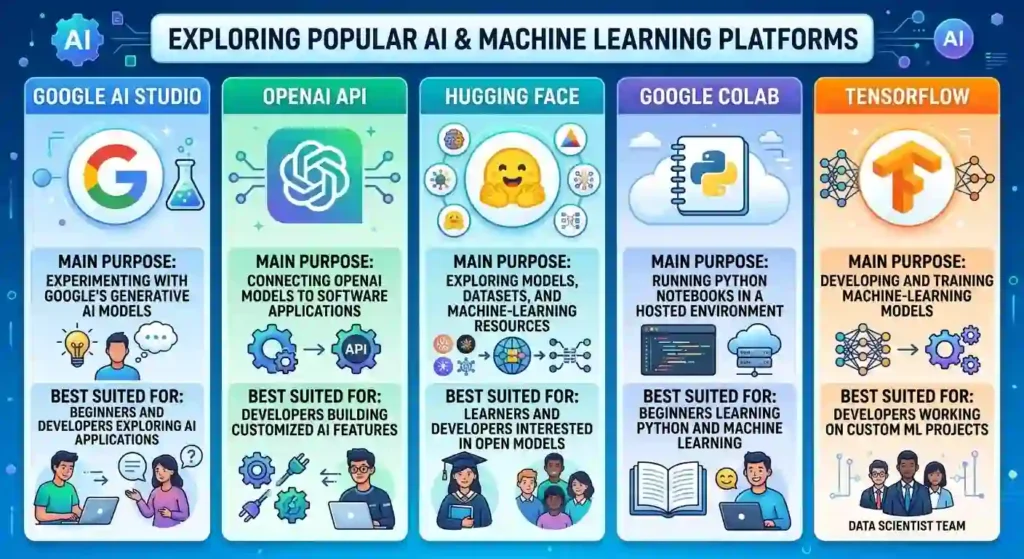
These tools serve different purposes, so they aren’t direct replacements for one another. Their features, access requirements, and pricing can change. Review the current documentation before choosing a platform.
If you’re new to AI development, start with one tool and one small project. Learning several platforms simultaneously can make the process more confusing than necessary.
How to Create Your Own AI Without Coding
If you don’t have programming experience, you can still explore AI development through no-code tools.
The key is to select a project that the platform can support without requiring extensive customization.
For example, suppose you want to create an assistant that answers questions about your services.
Begin by defining its purpose and identifying the information it should use. Next, choose a platform that supports your desired type of chatbot or assistant.
Configure its instructions, provide approved reference information where supported, and test it with common customer questions.
Review the answers carefully. If the platform allows you to customize the interface, make the instructions clear and explain what users should expect from the assistant.
Before publishing, investigate the platform’s usage limits, privacy practices, and available integrations.
There are limitations to consider.
A no-code platform may not support every feature you want. You may also have less control over the underlying model, data processing, or application behavior.
Some platforms offer free entry-level options but charge for higher usage or advanced features.
Nevertheless, no-code development can be an effective way to validate an idea. If your application becomes more complex, you can later consider custom development.
The important thing is to start with a realistic goal and verify that the finished application is genuinely useful.
How Much Does It Cost to Create Your Own AI?
The cost of building AI depends on your approach, usage, and technical requirements.
A simple prototype built with a free development environment may cost little or nothing initially. However, a production application can introduce expenses for model usage, hosting, storage, software subscriptions, and maintenance.
Using an existing model is often more accessible than training a large model from scratch.
For a small project, start by estimating the number of users and requests you expect to receive. Then use the provider’s current pricing information to calculate an approximate operating cost.
Remember that free access doesn’t always mean unlimited usage, and a low initial cost doesn’t guarantee that the application will remain inexpensive as it grows.
Training a model from scratch can involve additional expenses for data preparation, hardware, experimentation, and technical expertise.
You don’t need to make a large financial investment before you know whether your idea works. Start with a small prototype, measure its usefulness, and expand only when you have a clear reason to do so.
Common Mistakes to Avoid When Building AI
Building your first AI application is a learning process. Avoiding a few common mistakes can make that process more manageable.
1. Trying to Build Too Much at Once
Beginners sometimes attempt to create a personal assistant that can answer every question, manage multiple services, and automate an entire business.
This creates unnecessary complexity.
Start with one task, make it work well, and add features gradually.
2. Choosing Tools Before Defining the Problem
A popular AI platform might not be suitable for your particular project.
Define the outcome you want first, then choose tools based on the features and resources you actually need.
3. Assuming AI Is Always Correct
AI models can generate inaccurate information, misunderstand instructions, or present uncertain answers confidently.
Test the application with realistic examples and provide clear guidance about when it should acknowledge that it doesn’t know an answer.
For applications involving important decisions, consider additional human review and stronger verification procedures.
4. Ignoring Privacy and Security
Your application might handle questions, documents, account information, or other sensitive data.
Collect only the information you need, protect credentials, review the provider’s data-handling practices, and restrict access appropriately.
Never assume that information is private simply because it is being processed by an AI tool.
5. Skipping Testing
An application that performs well in a demonstration may fail when users ask unexpected questions.
Test different scenarios before launch and continue monitoring performance afterward.
6. Spending Money Before Validating the Idea
You don’t need expensive subscriptions or specialized hardware to test every AI concept.
Start with the smallest practical version of your application. Invest more only when you understand the limitations of your current setup and can explain why additional resources are necessary.
Conclusion
Creating your own AI doesn’t have to begin with complex algorithms or expensive hardware. Start by identifying a problem, choosing a suitable development approach, and building a small application that solves it. Test the results carefully, improve the application using feedback, and expand its capabilities when necessary. Whether you want to develop a chatbot, a personal assistant, or a business automation tool, the most important step is to begin with a clear purpose. You don’t need to build the most advanced AI system to create something useful. You need to build something that works, helps people, and gives you a foundation for learning more.
Frequently Asked Questions
1. Can I create my own AI for free?
Yes. You can experiment with free AI tools, development environments, and educational resources. However, free plans may have usage limits, and some projects require paid APIs, hosting, or other services as they grow.
2. Can I create my own AI without coding?
Yes. No-code platforms can help you build certain chatbots, assistants, and automated workflows. More complex applications may require programming or custom integrations.
3. Do I need Python to build my own AI?
No. You can create some AI applications without Python by using existing models and no-code platforms. Python becomes useful when developing custom machine-learning systems or building more flexible applications.
4. How long does it take to create an AI application?
A basic prototype might take a few hours or several days, depending on your experience and the tools you use. More complex applications can take weeks or months to develop, test, and maintain.
5. What is the difference between building an AI application and training an AI model?
Building an AI application involves creating software that uses AI to perform a task. Training an AI model involves using data and a training process to develop or adapt the model’s capabilities. Many applications use existing models rather than training new ones.
6. Can I create my own AI chatbot for a website?
Yes. You can use a supported chatbot platform or connect an existing AI model to your website. You’ll need to configure its behavior, provide appropriate information, test its responses, and consider privacy and security before publishing it.
7. Can I make money from my own AI application?
Potentially. You might offer an AI-powered service, develop a subscription product, or create a tool for a specific business need. However, earning money depends on whether the application solves a real problem, attracts users, and provides enough value to justify its cost.