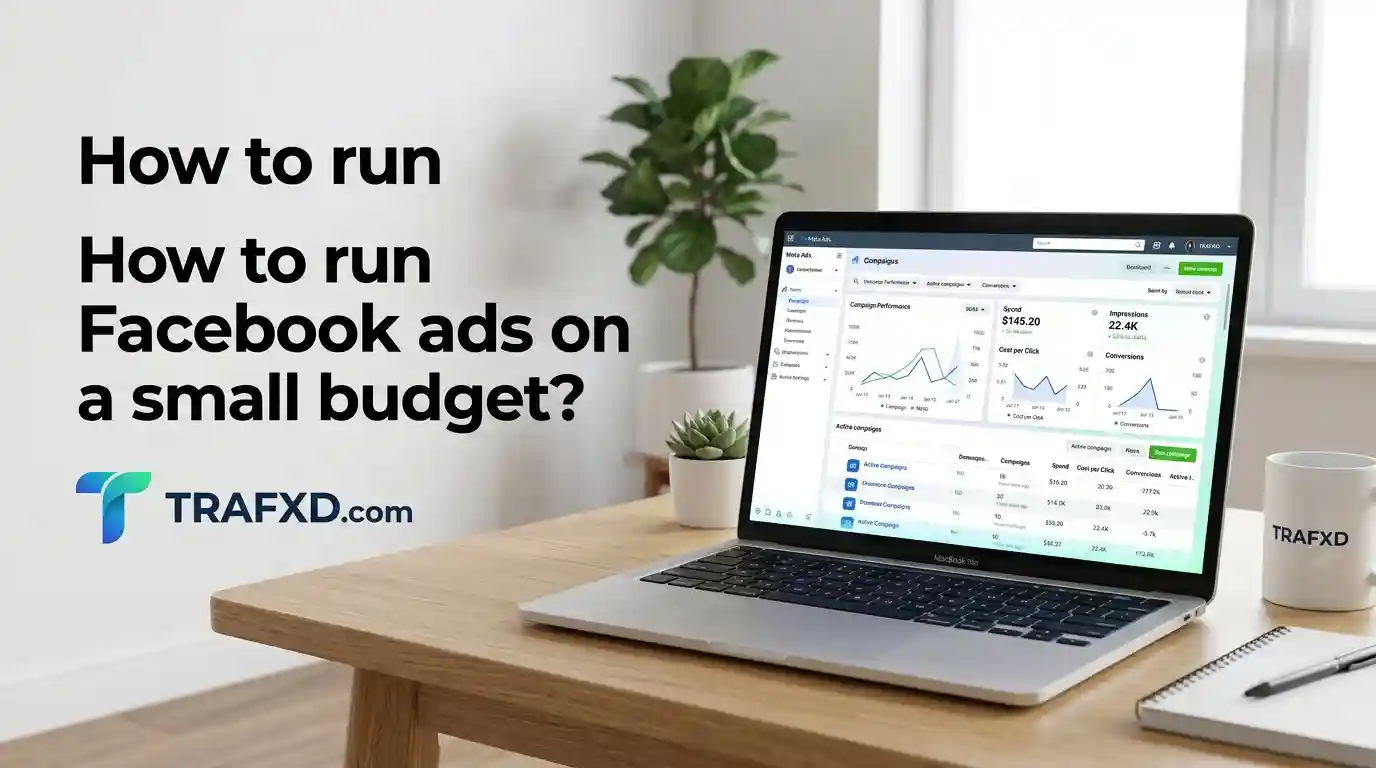
How to Run Facebook Ads on a Small Budget: A Beginner’s Guide
Running a small business with a limited budget can be challenging, especially when you want to attract more customers. Whether you own a bakery, clothing store, beauty salon, or online shop, advertising can help your business grow.
Facebook ads allow small businesses to reach potential customers through Facebook and Instagram without spending too much money. However, creating ads without a clear strategy can waste your budget and produce poor results.
Learning how to run Facebook ads on a small budget can help you target the right audience, control advertising costs, and attract potential customers. You don’t need a large budget to get started. Instead, focus on creating engaging ads, testing different approaches, and tracking your results.
In this beginner’s guide, you’ll learn how to create Facebook ads, choose your audience, set a realistic budget, write effective ad copy, and measure campaign performance. These practical tips will help you make smarter advertising decisions.
Understand How Facebook Ads Work
Before creating your first advertisement, it helps to understand the basic process.
Facebook ads are managed through Meta’s advertising tools. Depending on your campaign settings, your ads may appear on Facebook, Instagram, Messenger, or other available placements.
You can choose an advertising objective based on what you want people to do. For example, you might want someone to visit your website, send a message, submit a lead form, or purchase a product.
Your business pays for advertising according to the campaign’s billing and delivery arrangements. The amount you spend and the results you receive depend on several factors, including your audience, competition, offer, creative, and campaign objective.
Why small businesses use Facebook advertising
Facebook advertising can help businesses:
- Introduce products and services to relevant audiences.
- Promote special offers or new products.
- Generate inquiries from potential customers.
- Direct visitors to a website or product page.
- Build awareness in a particular service area.
- Test different advertising messages and creative ideas.
- Measure campaign activity and improve future decisions.
However, paid advertising is not a guarantee of sales. Your product quality, pricing, customer service, and buying process also influence whether people become customers.
Facebook ads versus boosting a post
Facebook offers a simple option to boost certain posts, while Meta Ads Manager provides more detailed campaign controls.
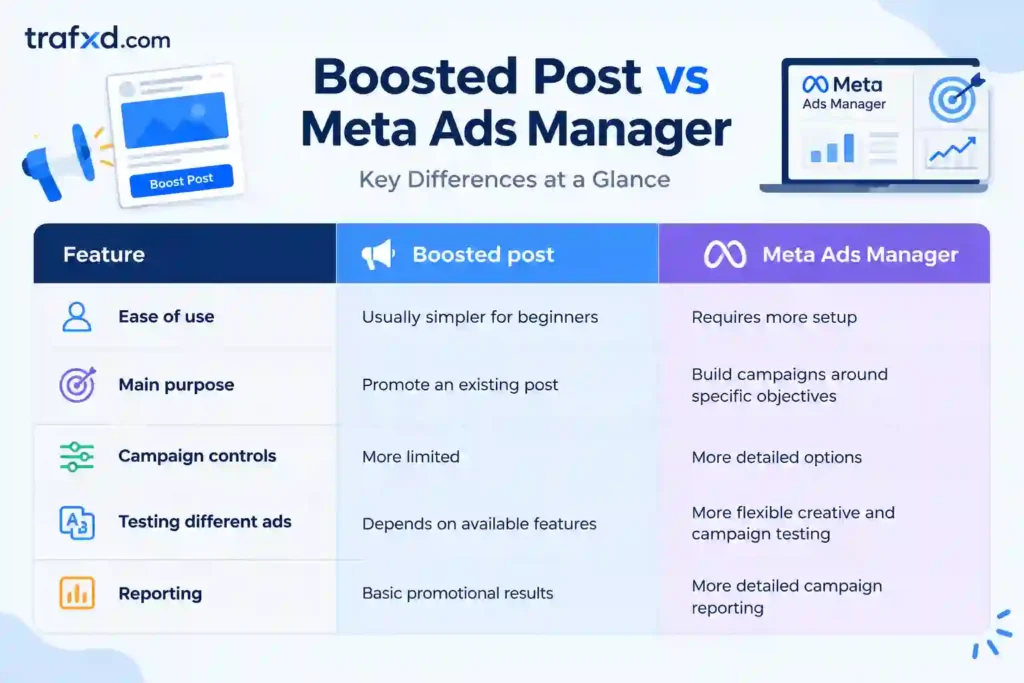
A boosted post may be suitable for a simple promotional goal. If you want to test different advertisements, control campaign settings, or measure specific outcomes, Meta Ads Manager is generally the better starting point.
For this guide, we will focus on creating a campaign through Meta Ads Manager.
Decide What You Want Your Advertisement to Achieve
One of the biggest mistakes beginners make is launching an advertisement without defining success.
Before spending money, decide what action you want potential customers to take. Your objective will influence how you set up the campaign and which results you should measure.
Choose an objective that matches your business
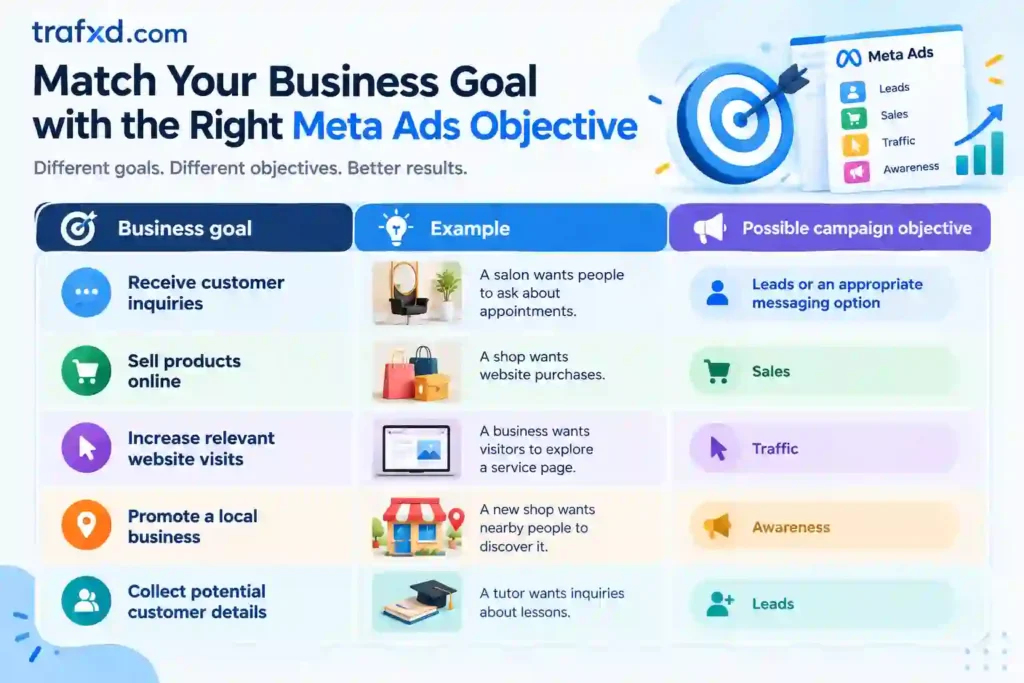
Meta changes its advertising interface and available options from time to time. Review the objectives and destination options available in your account before choosing one.
Identify the Right Audience for Your Business
Your advertisement does not need to reach everyone. It needs to reach people who are reasonably likely to be interested in your product or service.
For a small business, choosing a relevant audience can help you avoid spending money on impressions that are unlikely to lead to useful results.
Start with three customer questions
Ask yourself:
1. Who is most likely to need my product or service?
2. What problem or need does my business address?
3. Where can I realistically serve or deliver to customers?
For example, a local clothing shop may want to reach customers within its delivery area. A home cleaning business may need to focus on the locations where it provides services. An online store may serve customers across a wider region.
Example audience planning table
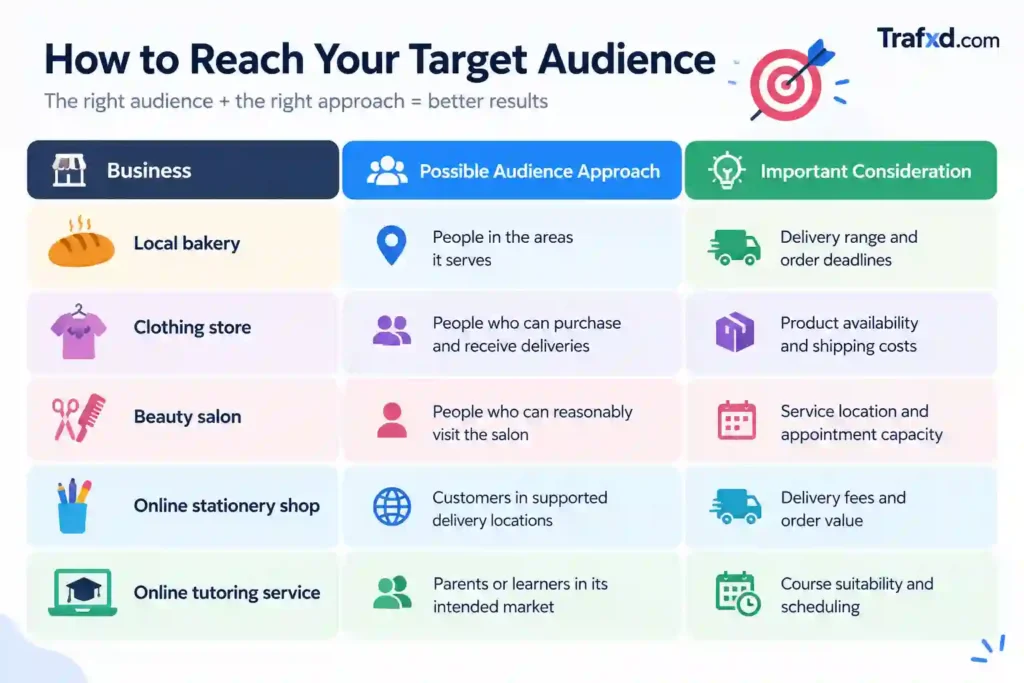
These are starting points, not guaranteed audience recommendations. Use actual customer information and campaign results to refine your choices.
Use location targeting carefully
If your business only serves one city, advertising across an entire country may waste money. Start with the area you can serve effectively.
For example, a local salon might begin with a suitable area around its location. An online store that delivers nationally may choose a broader geographic audience.
Do not make your target area so narrow that it becomes impractical to reach enough relevant people. The appropriate settings depend on your business model, audience, and campaign goal.
Avoid unnecessary targeting complexity
Beginners sometimes select many interests and narrow their audience repeatedly because they believe more detailed targeting always produces better results.
That is not necessarily true. The right audience depends on the product, available data, campaign settings, and creative.
Start with a reasonable audience that complies with Meta’s policies. Test changes when you have a clear reason to do so, rather than changing multiple settings at once.
Create an Offer That Gives People a Reason to Buy
A well-targeted advertisement may still perform poorly if the offer is unclear. Your offer explains what you are selling, why it may be useful, and how someone can take the next step. It does not always need a discount.
A bakery might promote a particular cake size with clear ordering details. A clothing store could showcase an outfit with its price and available sizes. A tutor might explain the subjects offered and how to arrange an introductory conversation.
Weak Offer Versus Stronger Offer
| Weak message | Stronger approach |
| We sell cakes | Show a specific cake design and explain how to ask about sizes, flavours, and prices |
| Buy our clothes | Show a list of available sizes, and explain the ordering process. |
| Best beauty salon | Highlight the specific service and explain how customers can book it. |
| Contact us for cleaning | Describe the cleaning service, the tasks covered, and how to request a quote. |
| Affordable online courses | Explain what the course teaches, who it suits, and how to enrol. |
The stronger versions provide useful details instead of relying on general claims.
Use the Value, Proof, and Action formula
A simple structure for your offer is:
- Value: Explain the benefit your product or service provides.
- Proof: Show genuine product images, a demonstration, transparent details, or authentic customer feedback.
- Action: Tell people how to learn more, make an inquiry, or place an order.
How to Set Up Your First Facebook Ad Campaign Step by Step
Once you have chosen your advertising goal, audience, and budget, it is time to create your first campaign. Meta Ads Manager gives you more control over your advertising settings and performance tracking.
Follow these steps to get started.
Step 1: Open Meta Ads Manager
Log in to your Meta business account and open Ads Manager. Make sure you have access to the correct Facebook Page and advertising account.
Step 2: Choose Your Campaign Objective
Click Create and select an objective that matches your business goal. Depending on your needs, you may choose sales, leads, traffic, or awareness.
Choose the objective based on the action you want customers to take.
Step 3: Set Your Budget
Choose a daily or lifetime budget that you can afford. Start with a controlled amount and decide how much you are willing to spend before launching your campaign.
Avoid increasing your budget before reviewing the results.
Step 4: Select Your Audience
Choose the locations and other permitted audience settings relevant to your business. If you operate locally, focus on areas you can serve. For an online business, consider where you can deliver products or provide services.
Keep your targeting simple until you have enough information to make improvements.
Step 5: Choose Your Ad Placements
Placements determine where your advertisement appears across Meta’s available platforms. Depending on your campaign settings, you may use automatic placements or select specific options.
Make sure your image or video works well in the placements you choose.
Step 6: Create Your Advertisement
Upload a clear image or video, write your primary text and headline, and select an appropriate call to action. Explain what you offer and why people should be interested.
Your advertisement should be easy to understand, visually appealing, and relevant to your audience.
Step 7: Review and Publish
Before publishing, check your budget, audience, ad copy, creative, and destination. Make sure your links work, and your advertisement follows Meta’s advertising policies.
Once everything is ready, submit your campaign for review. Monitor its status in Ads Manager to confirm that it has started delivering.
Write Facebook Ad Copy That Attracts Customers
Your ad copy should quickly communicate your offer and encourage people to take the next step. Avoid vague statements and focus on information that helps potential customers understand your product or service.
A simple structure can make your advertisement more effective:
- Hook: Grab attention with a relevant question or need.
- Benefit: Explain how your product or service helps.
- Details: Share important information about your offer.
- Call to action: Tell people what to do next.
Use natural language and keep your message focused. Avoid excessive emojis, misleading promises, and unsupported claims.
Your call to action should match your campaign objective. If you want inquiries, encourage people to contact you. If you want online purchases, make it easy for customers to visit the relevant product page and place an order.
Create Attractive Ad Images and Videos on a Budget
You do not need expensive equipment to create effective Facebook advertisements. A smartphone, good lighting, and a clear idea can be enough to produce useful content.
Focus on showing your product or service clearly rather than making the advertisement unnecessarily complicated.
Here are a few creative ideas you can try:
- Product photos: Show the actual product with clear details.
- Short videos: Demonstrate how a product works or how a service is delivered.
- Customer questions: Answer common questions that may prevent people from purchasing.
- Behind-the-scenes content: Show how you prepare, create, or package your products.
- Product demonstrations: Highlight useful features and benefits.
Keep videos focused on one main message. Start with an attention-grabbing visual, explain the benefit, and finish with a clear call to action.
Always use accurate images and genuine information. Your advertisement should set realistic expectations about what customers will receive.
Test Your Ads Without Wasting Money
Testing helps you understand which advertising messages and creative formats work best for your audience.
However, a small budget may not support several advertisements at once. If your budget is limited, start with one strong advertisement and improve it gradually.
When you have enough budget to test variations, change one major element at a time. You might test a different image, a stronger headline, or a clearer call to action while keeping other settings reasonably consistent.
Monitor the results and look beyond likes and comments. Pay attention to relevant clicks, qualified inquiries, purchases, and the cost of acquiring customers.
Avoid making decisions based on very limited data. Give your campaign an appropriate period to collect results, and remember that performance can vary depending on your product, audience, and sales cycle.
Measure the Results That Matter
Tracking your results helps you understand whether your advertising is contributing to your business goals.
Meta Ads Manager provides performance data that can help you evaluate campaign delivery and customer actions.
Pay attention to these important metrics:
- Reach: The number of unique accounts that saw your advertisement.
- Impressions: The number of times your advertisement was displayed.
- Click-through rate (CTR): The percentage of impressions that resulted in the type of click being measured.
- Cost per click (CPC): The average amount spent for the measured type of click.
- Cost per lead: The average advertising cost for generating a lead.
- Cost per customer: The advertising cost to acquire a customer.
- Return on ad spend (ROAS): Attributed revenue divided by advertising spend.
Choose metrics that match your campaign objective. For example, if you want customer inquiries, focus on the number and quality of leads rather than engagement alone.
You can also use a spreadsheet to record spending, inquiries, purchases, revenue, and advertising costs. Reviewing this information regularly will help you make more informed decisions.
Understand Why Your Facebook Ads May Not Be Working
Not every advertisement produces the expected results. Instead of immediately spending more money, identify where the problem may be occurring.
If your advertisement receives few clicks, review the creative, headline, and offer. people click but do not contact you or purchase, check whether your landing page is relevant, easy to use, and clear about the next step.
If you receive inquiries but very few sales, review your pricing, product information, response time, and the quality of the inquiries.
Also, check that your advertisement reaches people who can realistically purchase your product or use your service.
Make changes based on evidence rather than guesswork. Avoid changing multiple campaign settings simultaneously because this can make it harder to understand what influenced the results.
Remember that a short period or a small number of interactions may not provide enough information to judge a campaign fairly.
Improve Your Landing Page or Messaging Process
Your advertisement is only one part of the customer journey. After clicking, people need an easy way to learn more, ask questions, or complete a purchase.
If you send visitors to your website, make sure the page matches the advertisement. Use a clear heading, relevant information, accurate images, and a visible call to action.
Check that your website works properly on mobile devices and that important details, such as prices, delivery information, and contact options, are easy to find.
If you use messaging to receive inquiries, respond clearly and provide the information customers request. Avoid making people ask several times for basic details.
A smooth customer experience can help turn advertising interest into genuine inquiries and purchases.
Follow a Simple Plan for Your First Facebook Ad Campaign
A clear plan can help you manage your first campaign without becoming overwhelmed.
First, choose your offer. Decide which product or service you want to promote and identify the main benefit for customers.
Next, prepare your advertisement. Create a clear image or short video, write concise ad copy, and choose a suitable call to action.
Then, check your destination. Make sure your website, form, or messaging option works correctly and provides the information customers need.
After that, launch your campaign. Set your objective, audience, budget, and placements in Meta Ads Manager. Review all settings before publishing.
Finally, monitor your results. Track spending, clicks, inquiries, and purchases. Use the available data to decide whether to continue testing, improve your advertisement, or pause the campaign.
Do not assume that seven days will always be enough to determine success. The appropriate evaluation period depends on your budget, campaign objective, and how long customers take to make a decision.
Calculate Whether Your Advertising Is Profitable
Generating sales does not automatically mean your advertising is profitable. You must consider the costs involved in fulfilling each order.
Calculate how much money remains after product costs, delivery, payment fees, and other variable expenses. This amount helps you understand how much you can afford to spend acquiring a customer.
For example, if your business has a small amount remaining from each sale, you need to keep customer acquisition costs under control. If advertising costs exceed the amount available to cover them, you may lose money even when sales increase.
You should also understand return on ad spend (ROAS).
ROAS = Attributed revenue ÷ Advertising spend
A higher ROAS can indicate that your campaign is generating more attributed revenue relative to its advertising cost. However, ROAS does not account for all business expenses, so it should not be treated as profit.
Calculate your costs before deciding whether to continue or expand a campaign.
When Should You Increase Your Advertising Budget?
Increasing your budget may help you reach more potential customers, but it does not guarantee better results.
Before increasing spending, review whether your campaign is generating meaningful results at a sustainable cost. Check the quality of your leads, the number of completed purchases, and the profit remaining after relevant expenses.
You should also make sure your business can handle additional orders without compromising product quality or customer service.
If your campaign is performing well, consider increasing spending cautiously and monitoring the results. If it is losing money, investigate the offer, audience, creative, and customer journey before committing more funds.
The goal is not simply to spend more. It is to acquire suitable customers at a cost your business can afford.
Common Facebook Advertising Mistakes to Avoid
Beginners can waste their budgets by making avoidable mistakes. Understanding these problems can help you make better advertising decisions.
- Targeting the wrong audience: Focus on people and locations relevant to your business.
- Promoting too many products: Start with one clear offer so customers understand what you are advertising.
- Choosing an unsuitable objective: Match your campaign objective to the action you want people to take.
- Using unclear ad copy: Explain the offer and benefits in straightforward language.
- Ignoring the customer journey: Make sure your website or messaging process is easy to use.
- Measuring only engagement: Track qualified leads, purchases, acquisition costs, and profitability.
- Increasing spending too early: Review your results before committing more money.
- Ignoring advertising policies: Follow Meta’s current advertising rules and applicable legal requirements.
Avoid trying to fix every possible issue at once. Identify the most likely problem and test a practical improvement.
Use Your Results to Improve Future Campaigns
Your first campaign can provide valuable information even if it does not immediately generate sales.
You may discover that customers need clearer product details, that a particular message attracts more relevant inquiries, or that your website needs a simpler purchasing process.
Use these findings to improve your advertising and your overall business.
Review customer questions, identify common objections, and update your product descriptions or service pages when necessary. You can also use successful creative ideas to guide future social media content.
Over time, recording your results will help you recognise patterns and make better decisions about your advertising budget.
The most effective approach is to learn from each campaign, make changes based on evidence, and avoid repeating mistakes that cost your business money.
Conclusion
Learning how to run Facebook ads on a small budget is about more than spending less. It requires a clear objective, a relevant audience, useful advertising content, and careful measurement.
Start with one product or service, set a realistic spending limit, and create an advertisement that communicates your offer clearly. Use Meta Ads Manager to manage your campaign and track results that matter to your business.
If your campaign does not perform as expected, investigate the likely problem before spending more. If it produces sustainable results, consider increasing your budget gradually while monitoring profitability.
Remember that advertising works alongside other parts of your business, including pricing, product quality, customer service, and your website or messaging process.
You do not need to master every advertising feature immediately. Start small, learn from your results, and improve your approach over time. With careful planning, you can make more informed decisions and use your advertising budget more effectively.
Frequently Asked Questions (FAQs)
Can I run Facebook ads on a small budget?
Yes. You can begin with a controlled budget that you can afford to spend. Your results will depend on your offer, audience, competition, and campaign setup.
How much should a beginner spend on Facebook ads?
There is no universal budget for every business. Choose an amount that will not affect essential expenses and consider how much you can afford to spend to acquire a customer.
Is Meta Ads Manager better than boosting a post?
Meta Ads Manager generally offers more campaign controls and detailed reporting. Boosting a post can be suitable for simpler promotional goals.
What is the best objective for Facebook ads?
The best objective depends on your goal. Choose an option that matches the action you want customers to take, such as making a purchase or submitting an inquiry.
Do I need a website to run Facebook ads?
Not always. Depending on your campaign setup, you may direct customers to a website, lead form, messaging destination, or another supported option.
How do I know whether my Facebook ads are profitable?
Compare your advertising costs with the money remaining from sales after relevant variable expenses. Track customer acquisition costs and use ROAS alongside your profit calculations.
What should I do if my first Facebook ad campaign fails?
Review the campaign data, identify where potential customers stop taking action, and test one improvement before spending more money.
Can Facebook ads help a local business?
Yes. Local businesses can use Facebook advertising to reach people in the areas they serve. Results depend on the offer, targeting, customer experience, and campaign setup.