
Best SEO Tools for Beginners in 2027: Free & Paid Options
Starting a website is exciting, but getting it noticed on Google requires more than publishing articles. You need to understand what people are searching for, identify opportunities, monitor website performance, and fix technical problems. This is where SEO tools become useful. However, choosing the right platform can be confusing, especially when some tools offer expensive subscriptions and features beginners may not need. The best SEO tools for beginners should make essential tasks easier without creating unnecessary complexity. In this guide, we compare seven useful SEO tools, including free and paid options. You will learn what each tool does, where it performs well, its limitations, and which option makes sense for different websites and budgets in 2027.
Why Do Beginners Need SEO Tools?
Search engine optimization involves several activities, including keyword research, content optimization, technical SEO, backlink analysis, and performance tracking.
Trying to manage everything manually can take considerable time. SEO tools help organize these activities and provide useful information for making better decisions.
For example, a keyword research tool can help you discover what potential readers search for. A website auditing tool can identify broken links, while performance analytics can show which pages attract visitors.
However, remember that SEO tools provide information and recommendations, not guaranteed rankings. Google also explains that third-party tools cannot access its internal ranking data or guarantee search performance.
7 Best SEO Tools for Beginners in 2027
The following tools serve different purposes. Some are completely free, while others offer limited free access and paid subscriptions.
1. Google Search Console – Best for Tracking Google Performance
Google Search Console is one of the most important free SEO tools for beginners. It helps website owners understand how their pages appear in Google Search.
Instead of relying on estimated traffic data, you can examine performance information directly from Google.
Key features:
- Monitor website clicks and impressions.
- Discover which search queries bring visitors.
- Check average search positions and click-through rates.
- Submit XML sitemaps.
- Inspect individual URLs and indexing information.
- Identify certain technical and search appearance issues.
Practical use case:
Suppose you publish an article about website optimization. After several weeks, you want to understand whether Google is showing it to potential readers.
Open the Performance report and examine its queries, impressions, clicks, and average position. If the article receives impressions but few clicks, you can review its title and meta description to make them more relevant and appealing.
Limitations:
Search Console does not provide complete keyword difficulty analysis or detailed competitor research. It also does not replace a dedicated keyword research platform.
Verdict: An essential starting point for every website owner because it provides first-party Google Search performance data.
2. Google Keyword Planner – Best for Basic Keyword Research
Google Keyword Planner is a keyword research tool available through Google Ads. It helps users discover keyword ideas and examine estimated monthly search activity.
Beginners can use it to understand what potential customers are searching for before creating website content.
Key features:
- Discover related keyword suggestions.
- Review estimated monthly searches.
- Compare keyword trends and advertising competition.
- Explore keyword ideas using a website or starting phrase.
- Research location-specific search demand.
Practical use case:
Imagine you want to publish an article about WordPress security. Enter a phrase such as “WordPress security” into Keyword Planner.
The tool can suggest related searches that help you identify additional content ideas and understand the language people use.
Limitations:
Its competition metric primarily relates to Google Ads advertisers, not organic SEO difficulty. Search volumes can also appear in broad ranges, particularly without sufficient advertising activity. Basic keyword discovery requires completing Google Ads account setup, including billing information.
Verdict: A useful free starting point for keyword discovery, but combine it with organic SEO difficulty research before choosing your target keyword.
3. Semrush – Best for All-in-One SEO Research
Semrush is a comprehensive SEO platform designed for keyword research, competitor analysis, backlink monitoring, and website auditing.
It can be particularly useful when beginners move beyond basic SEO and want to manage several activities from one dashboard.
Key features:
- Keyword research and keyword difficulty estimates.
- Competitor organic research.
- Backlink analysis.
- Position tracking.
- Website technical audits.
- Content and search visibility research.
Practical use case:
Suppose you run a small digital marketing website and want to compete with established blogs.
You can research competing websites, identify keywords they receive traffic from, examine their top-performing pages, and discover topics that may be relevant to your audience.
This gives you a more informed content strategy than simply choosing topics based on personal interest.
Limitations:
Semrush offers a wide range of features, but its interface can initially feel complicated. Its paid subscriptions can also be expensive for someone managing a new website with limited revenue.
Some reports and searches are restricted by account limits.
Verdict: A strong option for growing websites, SEO professionals, and businesses that need several research tools in one platform. Beginners should explore available free access before purchasing a subscription.
4. Ahrefs – Best for Backlink and Competitor Analysis
Ahrefs is another established SEO platform, particularly useful for understanding backlinks, competitor websites, and keyword opportunities.
Backlinks are links from other websites pointing to your pages. Analyzing them can help you understand how competing websites build their online authority.
Key features:
- Backlink profile analysis.
- Competitor website research.
- Keyword research through Keywords Explorer.
- Website auditing.
- Rank tracking on supported plans.
- Organic search research.
Practical use case:
Imagine another website consistently ranks for topics related to WordPress development.
Using Ahrefs, you can examine its backlink profile and identify websites linking to its useful resources. You can then explore legitimate opportunities to create valuable content or build relevant industry relationships.
Limitations:
Ahrefs is powerful, but some advanced reports and keyword research capabilities require a paid subscription. Its metrics, such as Domain Rating, are third-party indicators and should not be treated as official Google ranking scores.
Its free account mainly focuses on verified websites and has usage restrictions.
Verdict: Particularly valuable for backlink research and competitor analysis. It becomes more useful when you already understand basic SEO concepts.
5. Ubersuggest – Best for Beginner-Friendly Keyword Research
Ubersuggest is an SEO research platform that offers keyword suggestions, competitor analysis, backlink information, and website auditing features.
Its straightforward interface makes it approachable for users who find larger SEO platforms overwhelming.
Key features:
- Keyword suggestions.
- Estimated search volume.
- Keyword difficulty estimates.
- Competitor research.
- Backlink information.
- Website audit reports.
Practical use case:
Suppose you want to write about AI tools for content creation.
Enter the topic into Ubersuggest and explore related keyword suggestions. Compare search demand and estimated difficulty to find a more focused topic that matches your website’s current authority and audience.
Limitations:
Its free access is limited, and advanced research requires a paid plan. Keyword volumes and difficulty scores are estimates rather than exact measurements of Google’s ranking decisions.
You should validate important keyword choices using additional sources.
Verdict: A reasonable option for beginners who want an approachable research interface without immediately learning a complex SEO platform.
6. Google Analytics 4 – Best for Understanding Website Visitors
Google Analytics 4 (GA4) is a free analytics platform that helps website owners understand visitor behavior.
Although it is not a dedicated keyword research tool, it plays an important role in measuring the results of your SEO activities.
Key features:
- Monitor website traffic.
- Understand visitor engagement.
- Analyze traffic acquisition channels.
- Track important user interactions.
- Examine landing page performance.
- Measure conversions and business goals.
Practical use case:
Suppose your website receives organic visitors, but you do not know which articles keep people engaged.
GA4 can help you examine landing pages, engagement, and user interactions. You can use these insights to improve content structure, navigation, and calls to action.
Limitations:
GA4 does not provide detailed keyword difficulty, backlink analysis, or complete organic search query information. For Google Search queries, Search Console is the more appropriate source.
It also requires correct configuration. Incorrect event tracking can lead to misleading reports.
Verdict: An important companion to Search Console for website owners who want to measure traffic quality rather than simply count visitors.
7. Yoast SEO – Best for WordPress Content Optimization
Yoast SEO is a popular WordPress plugin that helps website owners manage important on-page SEO settings.
It is especially useful for bloggers who want to optimize articles without editing technical code.
Key features:
- Edit SEO titles and meta descriptions.
- Analyze content readability.
- Review focus keyphrase usage.
- Generate XML sitemaps.
- Add structured data.
- Manage important SEO settings.
Practical use case:
When publishing a WordPress article, you can enter a focus keyphrase and review Yoast’s suggestions.
For example, if your article targets “best SEO tools for beginners,” Yoast can help you review keyphrase placement and readability.
You can then improve your introduction, headings, title, and meta description naturally.
Limitations:
Yoast cannot guarantee higher Google rankings. Its readability and keyphrase recommendations are guidelines, not a complete measure of content quality.
Following every suggestion mechanically can also make writing unnatural.
Verdict: A practical WordPress plugin for managing on-page SEO, particularly for bloggers and website owners who publish content regularly.
Free vs. Paid SEO Tools: Which Should Beginners Choose?
The right choice depends on your website’s requirements, budget, and experience.
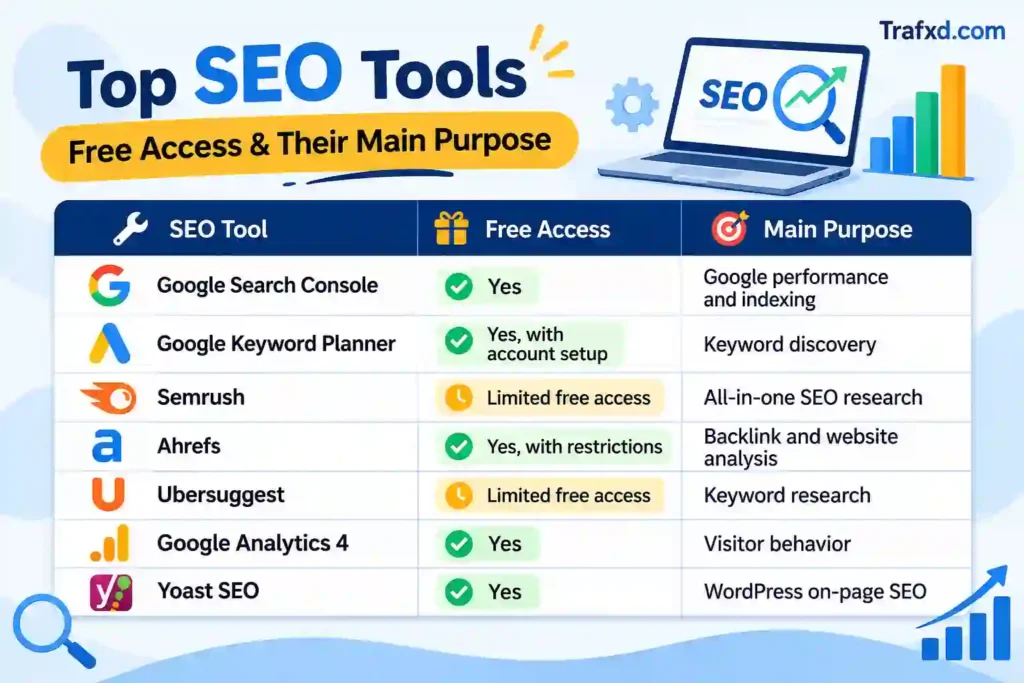
Free tools are generally enough to establish a basic SEO workflow. Paid platforms become worthwhile when you need more detailed competitor research, keyword analysis, backlink data, or reporting.
For example, a blogger managing one website may not need an expensive subscription immediately. However, someone providing SEO services to multiple clients may benefit from a more comprehensive platform.
How to Choose the Right SEO Tool for Your Website
Before paying for an SEO subscription, consider these factors:
1. Identify your main SEO requirement
If you need keyword research, explore Keyword Planner and Ubersuggest. For website performance, start with Search Console. For backlink research, consider Ahrefs.
2. Consider your budget
Do not purchase several subscriptions simply because other SEO professionals use them. Start with free options and upgrade when a specific limitation affects your work.
3. Check ease of use
A tool should make your work easier. If its interface is confusing, learn one feature at a time rather than trying to understand everything immediately.
4. Compare data and limitations
Different SEO platforms use different databases and calculation methods. Their keyword volumes and difficulty scores may not match.
5. Look beyond keyword rankings
Technical health, useful content, user experience, and relevant backlinks also matter. Select tools that support your complete SEO strategy.
A Simple SEO Workflow for Beginners
You do not need seven subscriptions to manage a website. Start with a simple process:
- Research keywords: Use Keyword Planner to discover relevant search terms and additional topic ideas.
- Evaluate competition: Use Ubersuggest or available Ahrefs features to investigate organic keyword opportunities.
- Create useful content: Write original articles that answer real questions and satisfy search intent.
- Optimize your WordPress pages: Use Yoast SEO to manage titles, descriptions, sitemaps, and on-page settings.
- Monitor performance: Use Google Search Console to review impressions, clicks, and search queries.
- Analyze visitor behavior: Use GA4 to understand how visitors interact with your website.
- Improve your strategy: Review performance regularly and update pages where meaningful improvements are needed.
This approach helps beginners understand SEO step by step without spending money on unnecessary software.
Common Mistakes to Avoid When Using SEO Tools
Even useful SEO platforms can lead to poor decisions when their data is misunderstood.
Avoid these common mistakes:
- Targeting every high-volume keyword: A keyword with thousands of searches may be too competitive or irrelevant to your audience.
- Trusting difficulty scores blindly: Third-party keyword difficulty metrics are estimates, not Google’s official ranking measurements.
- Ignoring search intent: Your content should answer what people actually want to know.
- Over-optimizing articles: Repeating the same keyphrase unnecessarily can damage readability.
- Buying multiple subscriptions too early: Focus on the features you genuinely need.
- Ignoring technical SEO: Check indexing, broken links, mobile usability, and website performance.
- Expecting instant rankings: SEO requires consistent improvements, useful content, and time.
Conclusion
Choosing the best SEO tools for beginners in 2027 is not about purchasing the most expensive software. It is about understanding your website’s needs and selecting tools that help you make informed decisions. Google Search Console, Keyword Planner, and Google Analytics 4 provide a strong starting point, while Semrush, Ahrefs, and Ubersuggest offer additional research capabilities as your experience grows. WordPress users can also benefit from Yoast SEO for managing on-page optimization. Start with the essentials, learn how to interpret their data, and invest in advanced features only when your website needs them. If you want to improve your website’s search visibility but are unsure where to begin, visit Trafxd.com for practical SEO guidance and professional support with keyword research, WordPress optimization, and website growth.